
Showing posts with label Google Nexus 7. Show all posts

3.07.2013

PARANOIDANDROID 3.1 ROM build Mar 7[AOSPA 4.2.2 JDQ39] for NEXUS


Instructions

1. UPDATE RECOVERY
2. FACTORY RESET
3. INSTALL ROM, GAPPS
4. WIPE CACHE & DALVIK CACHE
5. REBOOT
PARANOIDANDROID 3+ UPDATES DO NOT NEED A FACTORY RESET,
BUT YOU NEED TO INSTALL GAPPS .

BUILDS STARTING FROM MARCH 2ND USE GOOGLES NEW 4.2.2 DRIVERS.
YOU MUST BE UP TO DATE REGARDING YOUR RADIO (AND BOOTLOADER)
OR ELSE NO 4.2.2 ROM WILL WORK FOR YOU.
YOU CAN DOWNLOAD FROM GOOGLE AND FLASH VIA FASTBOOT,
OR GET IT STRAIGHT FROM below links as a CWM Flashable ZIP.This zip will update your baseband and bootloader to the ones in the JDQ39 update.

Download Baseband and Bootloader

Download Baseband only

Download Bootloader Only

Download Fix for sensors
 Only flash if your sensors are broken after you flash everything else. Most roms should be updated to 4.2.2 with proper props now so this shouldn't be needed.

Screen shots:-



Settings Tutorial:-
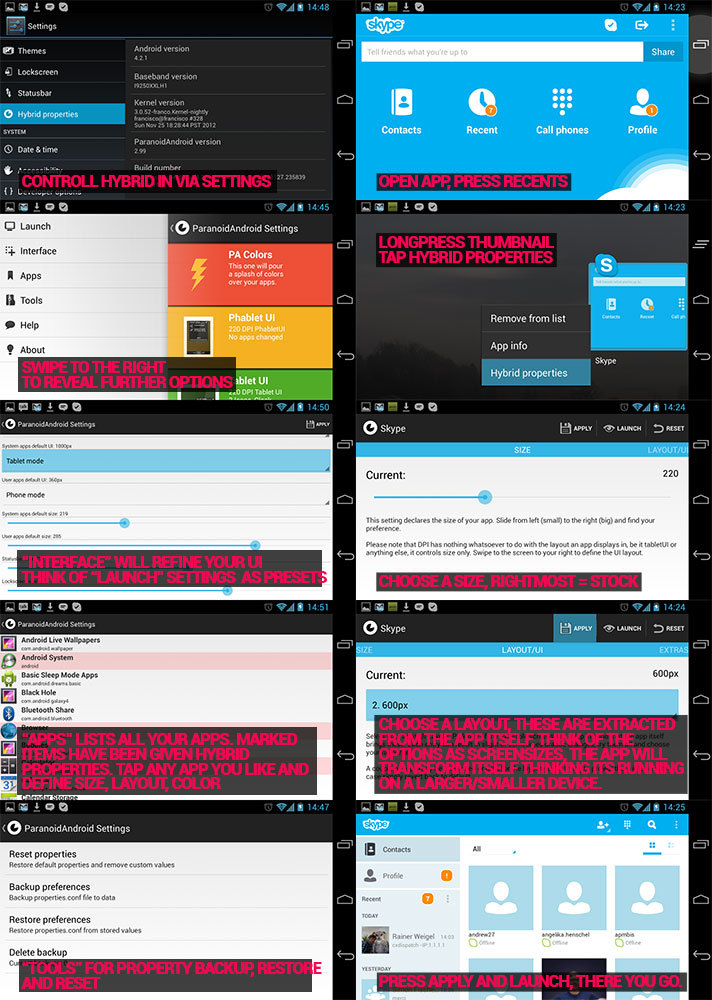
CREDITS, 
AOSP/Google, Cyanogenmod, Goo, XDA, Krebsmilk, giannisgx89, Liquid, AOKP.

LINKS,


Forum links:xda Link 1 & Link 2

12.22.2012

Official CM10.1 Builds for Nexus 7, Galaxy Tab 2 and Galaxy S

CyanogenMod has been one of the most popular custom ROMs ever. The release CyanogenMod9 was widely accepted that made CM10 the most awaited ROM. For quite sometime the unofficial releases of CM10.1 for almost all popular Android devices has been rolling out. The unofficial ROMs are mostly less stable and may not contain all the features of official build. But now the official build has released for a number of devices. The list includes Nexus 7, Galaxy Tab 2 and Galaxy S. The list will keep growing and the other device owners can expect to have the goodness of official CM10.1 soon.


Nexus 7

1. Download Mod
2. Download GAPPS
3. Place on SD card(internal storage)
4. Reboot to recovery,
5. flash nightly_xxxx.zip, flash gapps.zip

Downloads


Galaxy Tab 2

1. Install ClockworkMod recovery
2. Download the build
3. Reboot into recovery and Install

Galaxy S

How to install

Upgrading from another CM10.1 Build

1. Do a Nandroid Backup
2. Install the ROM from internal sdcard using ClockworkMod Recovery
3. Optionally install the Google Addon

Coming from CM7/CM9/CM10

1. Do a Nandroid Backup
2. WIPE (wipe data/factory reset + wipe cache partition)
3. Then follow steps 1 to 3 from previous

First time flashing CyanogenMod

1. Root your device and install ClockworkMod Recovery.
2. Reboot into Recovery using 3-button-combo
3. Then follow steps from 1 to 3 as above

Download

10.12.2012

Google Announces The Android Jelly Bean 4.1.2 Update : Nexus 7 Tablet gets it first

Google launches the update Jelly Bean 4.1.2 and is available for the Google Nexus 7 tablet and the Android Open Source Project mirrors. The update comes with the an OTA for the Nexus 7, which now benefits from a landscape-capable default launcher. Another feature present is a one-touch notification center.The update is merged into CyanogenMod 10 and is too fast for the merge which is just announced.


(Thanks to http://www.xda-developers.com)


The build number is JZO54K and the AOSP tags are android-4.1.2_r1 and jb-mr0-release. 

Google says the update improves performance and stability and fixes bugs. But its reported that it is not much useful, but definitely it is a start and many more updates are to roll out. Google request to make the update soon it arrives and the future variants of the grouper hardware will have a minor change in one of the components that will not be compatible with 4.1.1.

We give here the manual method of rooting the update.

Downloads


Steps

1. Root your Nexus 7

2. flash ClockworkMod Recovery

3. Download Android 4.1.2 Jelly Bean JZO54K

4. Place it directly under /sdcard

5. Reboot to ClockworkMod (CWM) Recovery.

6. Navigate to install zip from sdcard
    (choose zip from sdcard and then select the file you transferred in Step 4)

7. Select reboot system now from the main menu.

Related Posts Plugin for WordPress, Blogger...