Showing posts with label Jelly Bean. Show all posts

3.07.2013

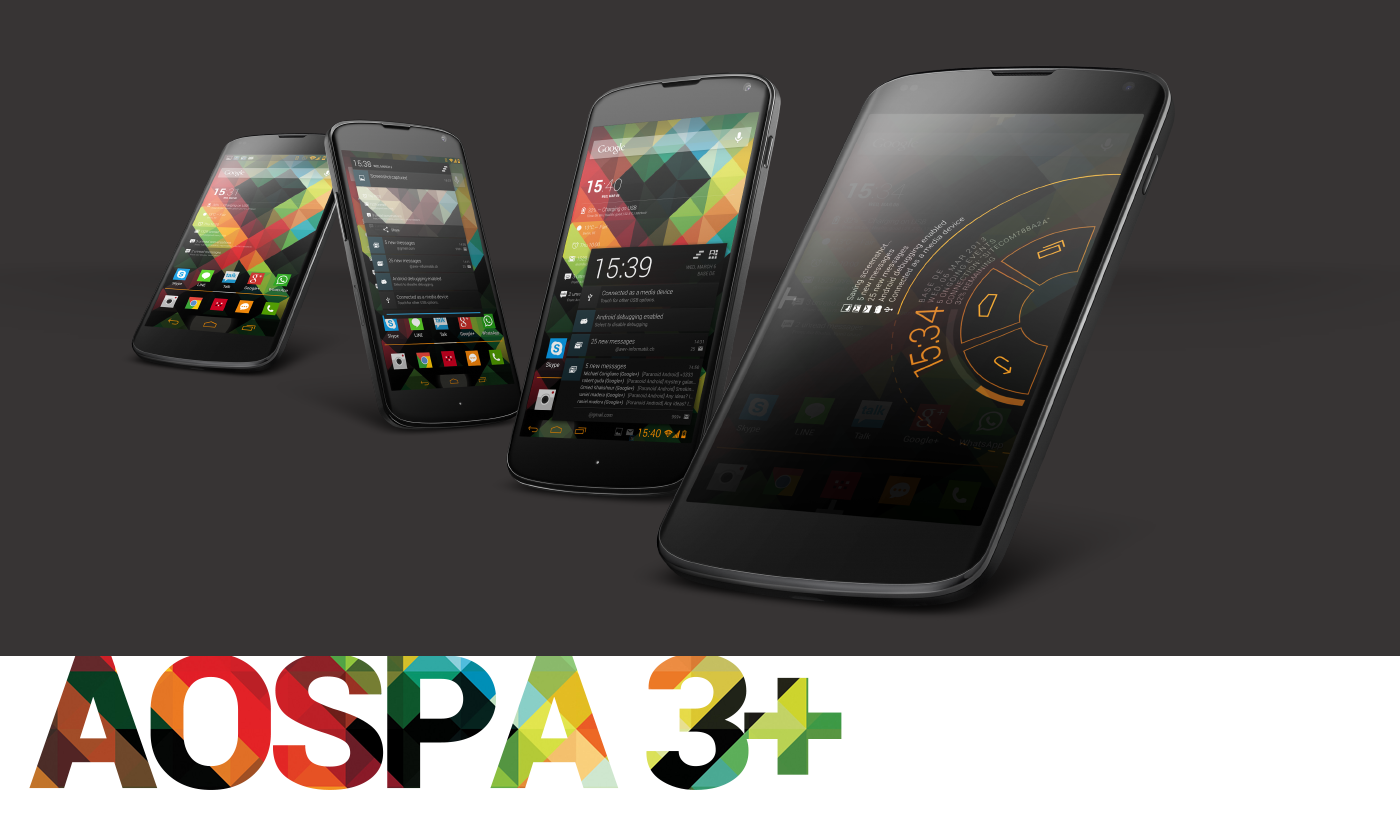
PARANOIDANDROID 3.1 ROM build Mar 7[AOSPA 4.2.2 JDQ39] for NEXUS


Instructions

1. UPDATE RECOVERY
2. FACTORY RESET
3. INSTALL ROM, GAPPS
4. WIPE CACHE & DALVIK CACHE
5. REBOOT
PARANOIDANDROID 3+ UPDATES DO NOT NEED A FACTORY RESET,
BUT YOU NEED TO INSTALL GAPPS .

BUILDS STARTING FROM MARCH 2ND USE GOOGLES NEW 4.2.2 DRIVERS.
YOU MUST BE UP TO DATE REGARDING YOUR RADIO (AND BOOTLOADER)
OR ELSE NO 4.2.2 ROM WILL WORK FOR YOU.
YOU CAN DOWNLOAD FROM GOOGLE AND FLASH VIA FASTBOOT,
OR GET IT STRAIGHT FROM below links as a CWM Flashable ZIP.This zip will update your baseband and bootloader to the ones in the JDQ39 update.

Download Baseband and Bootloader

Download Baseband only

Download Bootloader Only

Download Fix for sensors
 Only flash if your sensors are broken after you flash everything else. Most roms should be updated to 4.2.2 with proper props now so this shouldn't be needed.

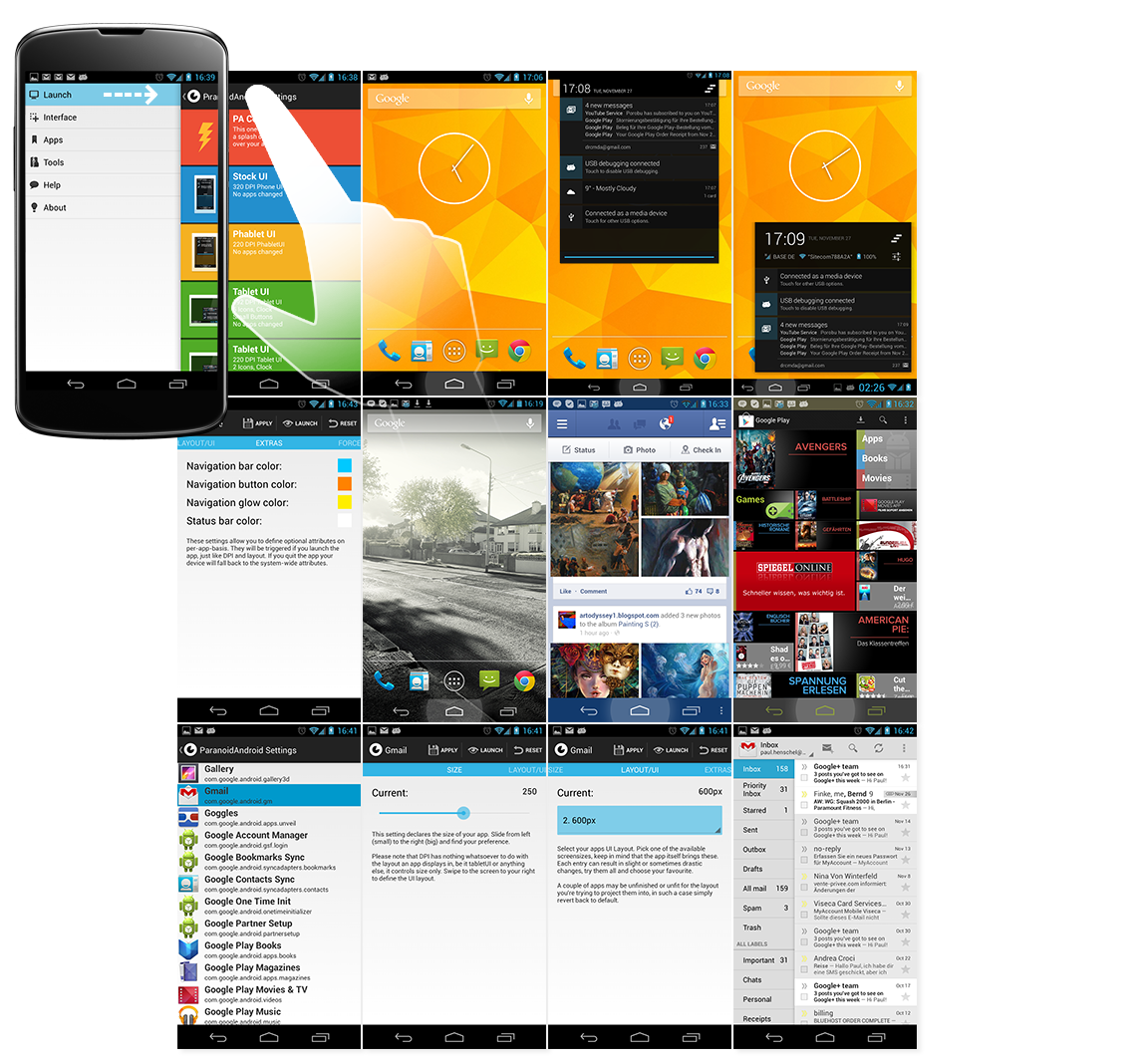
Screen shots:-


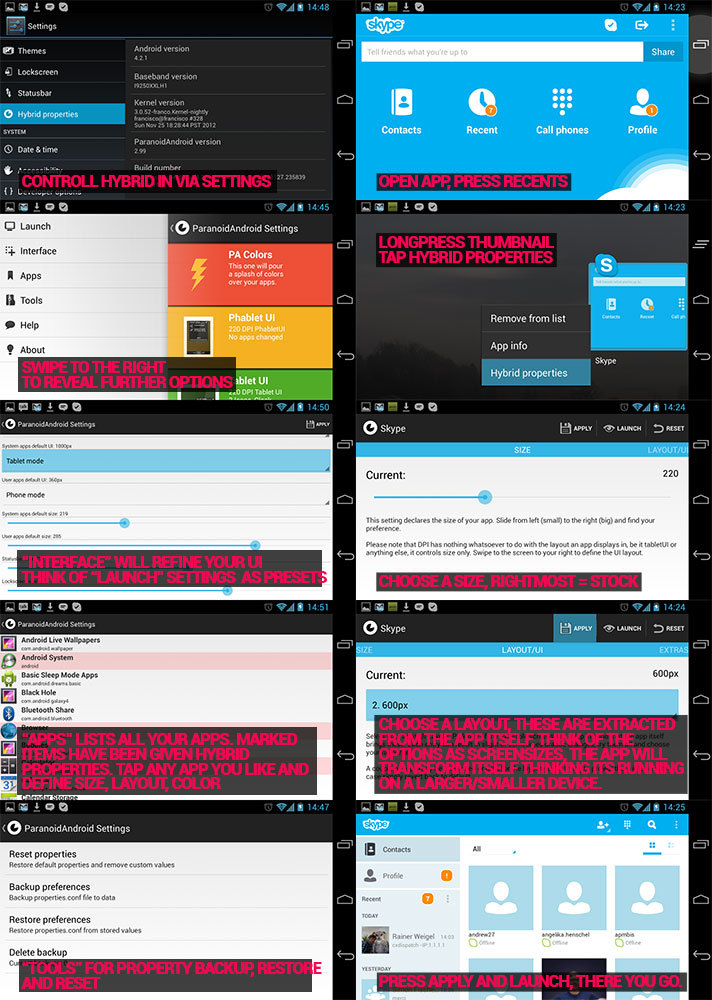
Settings Tutorial:-
CREDITS, 
AOSP/Google, Cyanogenmod, Goo, XDA, Krebsmilk, giannisgx89, Liquid, AOKP.

LINKS,


Forum links:xda Link 1 & Link 2

12.14.2012

Samsung Galaxy Note II Gets Jelly Bean build I605VRALJB : Rooting guide

There was a build released for Galaxy Note II which was dated 12/6/12.  The fully customizable new build brought some exiting features and options for customization to Note II. The same build's version 2 has now released dated 12/13/12. The changelog is a bit exiting including aroma installer, extended reboot menu, and some touchwiz applications.


About the Build

I605VRALJB
Dare : 12/13/12

Whats New
  • added aroma installer
  • added extended reboot menu
  • added option for stock clock or center clock
  • added option for filemanagers
  • option for touchwiz or apollo music app
  • option for touchwiz or 4.2 keyboard app
  • option for touchwiz or aosp ui sounds
  • fixed framework-res related bugs
Downloads

http://www.androidfilehost.com/?fid=9390225151984926937
Md5: e21ffb6d8cc9f63352e59927329ce56e

Steps

Wipe Data Factory Reset!
Wipe davlick cache
install zip
pick your options

Source

xda-developers.com
forum.xda-developers.com

10.22.2012

HTC One X Gets Jelly Bean : How to Root it Safely

In the beginning of October Jelly Bean leak was available for HTC One X. But the method of flashing the leak was dangerous. But that can never keep away one of the most popular smart phones from getting the Jelly Bean update. Here is another method of flashing the root. The main advantage of the method is that the firmware can be changed back to stock firmware.
About The Tool

Display your CID
Lock Bootloader
Update JB FW, inc HBoot 1.28
Unlock Bootloader
Flash custom CWM recovery
Flash boot.img

Compatible CIDs

HTC__001
HTC__E11
HTC__203
HTC__102
HTC__405
HTC__Y13
HTC__A07
HTC__304
HTC__M27
HTC__032
HTC__016
HTC__J15

Steps
  • Download the JB ROM and put on your Phone's virtual SD card
  • Download the boot.img for your chosen JB ROM and put in the root of the folder created by this tool and the name must be exactly boot.img
  • Unlock_code.bin - Place this in the same folder (You will get this file when you unlock your bootloader)
  • Unzip the downloaded file and run JBFWFlasher.bat
  • To install CWM you have to select option 2 while you runs it.
Source

9.28.2012

Unofficial CM10 Port for the Samsung Galaxy S Plus

 XDA Senior Member Doomsday94 has released an unofficial preview build of CyanogenMod 10.
The build is a little shaky, which is why it is called a preview.

CyanogenMod is based on the Android Open Source Project with extra contributions from many people within the Android community. It can be used without any need to have any Google application installed. Linked below is a package that has come from another Android project that restore the Google parts. CyanogenMod does still include various hardware-specific code, which is also slowly being open-sourced anyway.
All the source code for CyanogenMod is available in the CyanogenMod Github repo. And if you would like to contribute to CyanogenMod, please visit out Gerrit Code Review.

Preview: https://docs.google.com/file/d/0B-NP...Z0k/edit?pli=1
Google Apps: http://goo.im/gapps

First time flashing CM10 to your Galaxy S Plus (or coming from another ROM)?

  1. Root your device and install ClockworkMod Recovery.
  2. Reboot into Recovery using 2-button-combo
  3. Do a Nandroid backup!
  4. WIPE (wipe data/factory reset + wipe cache partition)
  5. Install the ROM from internal sdcard using ClockworkMod Recovery
  6. Optionally install the Google Addon

Upgrading from CM7/CM9?

  1. Do a Nandroid Backup!
  2. WIPE (wipe data/factory reset + wipe cache partition)
  3. Install the ROM from internal sdcard using ClockworkMod Recovery
  4. Optionally install the Google Addon

Upgrading from another CM10 Build?

  1. Do a Nandroid Backup!
  2. Install the ROM from internal sdcard using ClockworkMod Recovery
  3. Optionally install the Google Addon

Note: Nandroids of CM7, CM9 and CM10 are incompatible due to partition layout changes. Please be on the correct version before restoring Nandroids.

What Works:
Audio
Video (sometimes youtube crashes)
Receiving and making calls
Proximity sensor
Wifi
Bluetooth
USB mass storage
HW accelerated gui
HW accelerated video
60% project butter
Not Working:
headset audio
camera
full butter experience
many other things

As you can expect, this is definitely not daily driver material just yet. However, it provides Galaxy S Plus users with a base from which to proceed and a known number of bugs to squash. It may not be long until there is a more stable version for users to flash.

For more information, check out the original thread.

9.25.2012

SAMSUNG GALAXY S3 I9300 GETS OFFICIAL ANDROID JELLY BEAN I9300XXDLIB (4.1.1) : I9300 ROOTING GUIDE

The most awaited official Jelly Bean 4.1.1 has rolled out for Samsung Galaxy S3. Android Jelly Bean I9300XXDLIB (4.1.1) is now available for users in Poland. The update can be done using Odin. methods like CF root works for this update. Flashing the device from other locations will alter the CSC of the device. Pre rooted version is also available. The firmware can be used for devices which have been already rooted with I9100XXDLI7 and I9100XXDLH6.


As the official Jelly Bean firmwares has started to hit Galaxy S3, we can expect to have the same for devices from other regions soon. The rooting method using Odin 3.04 and download links are given

About the firmware

I9300XXDLIB
Base Firmware: I9300XXDLIB (4.1.1)
Region: Europe
Country: Poland
Carrier: Unbranded
Build Date: 21 September 2012
Modem: XXDLIB
CSC: OXFDLI1
Change List: 204919

Downloads


Odin 3.04 : Download

Steps

Download Mode : Home+power+vol down

Recovery Mode : Home+power+vol up
  1. Make Sure that phone has sufficient battery charge and all data has back up
  2. Unzip the firmware
  3. Connect phone to the computer
  4. Run Odin 3.04Turn off the device
  5. Put it in download mode
  6. Click PDA and select .tar.md5 file
  7. Untick re-partition (check whether it is ticked)
  8. Start flash
  9. Boot into recovery mode
  10. Choose to wipe/factory reset
  11. Reboot
  12. You will have Jelly Bean on your S3

8.23.2012

How to root I9300XXDLH6, I9300XXDLG4 Jelly Bean 4.1.1 Firmwares on Galaxy S3 : Rooting Guide

Samsung Galaxy S3 (GT-I9300) is getting a lot of firmware updates. Lot of people are working on it to make it better in each update. We have already described in our older posts about the I9300XXBLH4 JellyBean 4.1.1 update. Now we are here with the next update, that is  I9300XXDLH6 leaked firmware which based on the base firmware I9300XXDLG4. The firmware  should not be done in a Galaxy S3 with a custom ROM. So if you are in such a condition go for the stock ROM and then try the update.
After this leaked firmware, Samsung has already launched the official firmware in http://www.sammobile.com/. This original firmware can be rooted using Samsung Kies. Here we are describing the methods of rooting of the leaked firmware using Odin. The same official update can be done using Samsung Kies software. The official update can be downloaded from www.sammobile.com. The leaked firmware download link and rooting method using Odin is given here.

About the Firmware

Firmware: I9300XXDLH6 (4.1.1)
Base Firmware: I9300XXDLG4 (4.1.1)
Region Europe
Country: United Kingdom
Carrier: Unbranded
Build Date: 21 August 2012
Modem: XXLH6
CSC: OXADLH6
Change List: 61691


About the official Firmware
PDA: I9300XXDLH6
CSC: I9300OXADLH6
Version: 4.1.1
Date: 2012-08-01
Regions: Austria, Belgium, France, Germany, Hungary, Italy, Spain, United Kingdom

Before Rooting
  • The handset must have good battery backup
  • The device must have original ROM in it while rooting it
  • Make sure that all data in the phone has backup
Downloads

1. Firmware


2. Odin

Link : Download
(For other versions of Odin you can check out the Odin Versions section in our site)

Steps

  1. Unzip the firmware zip file downloaded
  2. Run Odin 3.04
  3. Restart phone in download mode
  4. Connect phone to the computer
  5. Untick re-partition (check whether it is ticked)
  6. select the .tar file
  7. Start flash
  8. Boot into recovery mode
  9. Choose to wipe/factory reset
  10. Reboot
Download mode : Home+power+vol down
Recovery mode : Home+power+vol up

Sources

www.sammobile.com
http://forum.xda-developers.com
http://forum.xda-developers.com/showthread.php?t=1835931

8.17.2012

How to root I9300XXBLH4 Jelly Bean 4.1.1 on Galaxy S3 : Rooting Guide

The most talked smart phone ever may be Samsung Galaxy S3. The waves it has made in the beginning is still making movements in the Android world. The rooting guides and firmwares on the model has been under development and the results are getting out from various developers.
I9300XXBLH4 Jelly Bean 4.1.1 custom roms are available now for unofficial rooting. It is for international version of samsung galaxy S3, GT-I9300.Using this you can update your ICS 4.0.4 directly to latest Jelly Bean. 

Download rom : I9300XXBLG8/I9300OXABLG8/I9300XXLH1/I9300XXBLG8
Region BTU

Steps

  • First you will need to download Odin. This is a desktop program that transfers to your phone the files necessary for root.
  • Unzip the file
  • Unzip the rooting zip file
  • Start Odin by clicking the .exe file
  • Click the PDA button abd select the .tar file
  • Put your phone in download mode
  • Connect the phone to your computer
  • Make sure Repartition is NOT checked
  • Click the Start button
  • Wait for the device to boot


Downloads


OTA update for for Galaxy S3 (GT-I9300)
  • http://samsung-updates.com/fw/Samsung-Updates.com-GT-I9300-BTU-JB_4_1_1-I9300XXBLH4-OTA-INTERNAL.zip 
ROM :
  • http://samsung-updates.com/fw/Samsung-Updates.com-GT-I9300_BTU_1_20120806161432_al03it6wa2.zip

References

7.18.2012

Official CM10 Preview for Galaxy S III i9300

The latest version of android, Jelly Bean 4.1.1 roots are now avilable for a number of handsets including Samsung galaxy Nexus and Galaxy S3. CyanogenMod 10, (CM10) the open source port for Galaxy S3 is now out. Even though the release have problems with its bluetooth, camera and Wi Fi, its going to be big surprise for the SGS3 users. The team is expected to come up with the update with less problems. 

How to install

  • Make sure to run CM9 or an AOSP-based ROM so you know you have everything already set-up
  • Download the zip, Gapps
  • Install the update zip from recovery
  • Install gapps
  • WIPE DATA/FACTORY RESET and REBOOT

Downloads 

You can find the download links in the original thread in http://forum.xda-developers.com


Source

6.29.2012

Android 4.1 Jelly Bean For Galaxy S3

Its hardly 2 months since Samsung launched Galaxy S3.  Reports says Android 4.1 Jelly Bean port is out for Galaxy S3 already. The port is just not for normal use, since most of the features are not working. The driver is just under development and may use at your own risk.

There is no news for official firmwares are not out yet. Since unofficial roots are coming we could expect to get the official firmwares soon. 


Features like Wi-FI, bluetooth and even camera are reportedly not working on the port. May be you can just check the hardware acceleration and call/SMS features. 

Finf more information in http://www.xda-developers.com.

Source

Jelly Bean : Android Gets Better


Android, the most popular mobile platform gets even better with the latest pin up, Jelly Bean. Jelly Bean 4.1 is the fastest and smoothest version of android ever. Android have been improving through out its dream run and so in Jelly bean, reports say.


Androids most popular version IceCream Sandwich has seen some of the amazing phones ever in it, including Galaxy S2, Galaxy Note and finally the one that amazed the world , Galaxy S3. Now its time for Jelly Bean. Reports says the Jelly Bean updates for popular smart phones are ready for release. 

We will come up with updates, stay connected to our rooting section.

Key Features


  • Vsync timing across all drawing and animation done by the Android framework, including application rendering, touch events and display refresh
  • Triple buffering in the graphics pipeline
  • Enhanced accessibilit
  • Bi-directional text and other language support
  • User-installable keyboard maps
  • Smarter Keyboard
  • Automatically resizable app widgets
  • Bluetooth data transfer for Android Beam
  • Offline voice dictation
  • Improved voice search
  • Google Now


3.24.2012

Android 5.0, aka Jelly Bean, set for Q3 release

Android 5.0 aka Jelly Bean is set to be released in the Q3 of 2012.The codename Jelly Bean is almost certain with many manufacturers such as ASUS confirming the name. This news comes at a time when the latest  data released by Google says that so far only 1.6% of android devices have got Ice Cream Sandwich installed in them. Most of the Android device manufacturers are set to roll out their ICS updates by the end of Q2.

We still don’t know much about the next version of Android, but expect to see plenty at Google I/O at the end of June. The sole rumor so far about Jelly Bean is being centered around a docked desktop-style interface.

Source: androidcommunity

Related Posts Plugin for WordPress, Blogger...