Showing posts with label angry birds. Show all posts

5.24.2012

Angry Birds for Symbian

Angry Birds was meant to be a game that could be played only in Android devices. but now we get you Angry Birds for Symbian phones. It supports S60v5 devices including 5230,5230,5800,5233 etc.


The animation and levels just look like those you have seen in Android. The game is full version with 49 levels. Download link is given below.


To download Click Here


3.28.2012

Angry Birds Space released in Google Play

   The all time favorite Android game Angry Birds gets its new version. The new game from Rovio is set in Space as the Angry Birds float in zero gravity. A giant claw takes their eggs and Angry Birds ends up in space chasing them. The new version will have new birds in zero gravity with 60 interesting levels.


Screen Shots


Download Link : Link


9.20.2011

Angry Birds game for PC


Download link  :  http://www.megaupload.com/?d=03YGDJ07
file size : 36.56MB
file type : rar
hosting   : megaupload


Working in : Windows XP , Windows Vista , Windows 7 (32bit)

9.09.2011

Latest Tweet Twitter Bird With Speech Bubble Gadget For Blogger


With the latest Twitter API it's become easy to create a neat latest tweets gadget.In this post i will show you how to add a Twitter bird with a speech bubble containing your latest tweet to your blog.The idea comes from Paulund.co.uk and all that's needed is some Css and a few lines of script.


View Demo 

Add The Latest Tweet Twitter Bird To Your Blog


Remember Always Back Up Your Template Before You Make Changes - How To Back Up A Blogger Template 

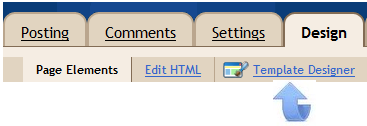
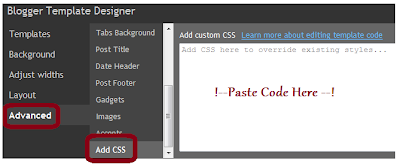
Step 1. In Your Blogger Dashboard Click Design > Template Designer, Then Advanced > Add Css


Step 2. Copy and Paste the following code into the Css section (See Paste Code Here Above)


1
2
3
4
5
6
7
8
9
10
11
12
13
14
15
16
17
18
#twitter_update_list li{
     background: #f4f8f9; /* Old browsers */
     background: -moz-linear-gradient(top, #f4f8f9 1%, #e8f0f2 100%); /* FF3.6+ */
     background: -webkit-gradient(linear, left top, left bottom, color-stop(1%,#f4f8f9), color-stop(100%,#e8f0f2)); /* Chrome,Safari4+ */
     background: -webkit-linear-gradient(top, #f4f8f9 1%,#e8f0f2 100%); /* Chrome10+,Safari5.1+ */
     background: -o-linear-gradient(top, #f4f8f9 1%,#e8f0f2 100%); /* Opera11.10+ */
     background: -ms-linear-gradient(top, #f4f8f9 1%,#e8f0f2 100%); /* IE10+ */
     filter: progid:DXImageTransform.Microsoft.gradient( startColorstr='#f4f8f9', endColorstr='#e8f0f2',GradientType=0 ); /* IE6-9 */
     background: linear-gradient(top, #f4f8f9 1%,#e8f0f2 100%); /* W3C */
     box-shadow: 1px -1px 2px #bbc6c8;
     -webkit-box-shadow: 1px -1px 2px #bbc6c8;
     -moz-box-shadow: 1px -1px 2px #bbc6c8;
     border-radius:7px;
     -moz-border-radius:7px;
     -webkit-border-radius:7px;
     padding:15px;
     width:300px;
}
Now we have our bubble we need to represent the speaking of this update which is done by adding an arrow to the bubble. This will done by using the :after CSS feature which adding content after the selected item. We need to add a triangle, to make a triangle in CSS you define the borders and give one side colour and make the other transparent and it will create a triangle. Copy and paste the follow to create the triangle in CSS.
1
2
3
4
5
6
7
8
9
10
#twitter_update_list::after {
    content: "";
    position: relative;
    left: 30px;
    border-width: 15px 15px 0;
    border-style: solid;
    border-color: #e8f0f2 transparent;
    display: block;
    width: 0;
}
That's it!
With just 2 lines of javascript, quick CSS changes and a picture of a big blue bird you can display your twitter updates on any web page in a speech bubble.
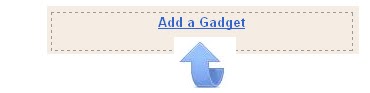
Step 3. Thats the Css added now return to the design page and click Add A Gadget > Choose Html / Javascript


Step 4. Copy and Paste the following code into the Html/Javascript gadget


<ul id="twitter_update_list">
<li>Loading Tweets..</li>
</ul>
<a title="Follow Me" href="http://www.twitter.com/paulcrowepro" target="_blank"><img src="https://blogger.googleusercontent.com/img/b/R29vZ2xl/AVvXsEin6YNOeVO94lH5QN1R1OCLxex4rBAQKKNLuRjhod_WYgO-Zbuw7DbV8uemDFs6Vd85goljgWQRd3si2rtPgI4DEENViVdbS55T7ROPBDZkAe0Vdqus080Nog9AbYlau9NlOoJYW-uG1JsD/s1600/twitter-bird-gadget.png" /></a>
<script type="text/javascript" src="http://twitter.com/javascripts/blogger.js"></script>
<script type="text/javascript" src="http://twitter.com/statuses/user_timeline/paulcrowepro.json?callback=twitterCallback2&count=1"></script>


Important - Change my Twitter username paulcrowepro x2 with yours.

Step 5. Click Save and check out your new Twitter gadget.

Thanks again to Paulund.co.uk

Related Posts Plugin for WordPress, Blogger...