Showing posts with label phone. Show all posts

3.24.2012

Dark Forces Team working on custom ROMs for HTC Titan and Radar


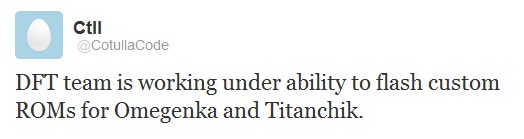
 As tweeted by Cotulla (@CotullaCode), the Dark Forces Team is working on bringing out custom ROMs to the HTC Radar and Titan. 


Nothing else was revealed like an ETA or progress of such a project. DFT has made a lot of headway in making custom ROMs for Windows Phones in the past (and even for Samsung devices), so if there is any group who can do this, it will be them.

Source: @CoutllaCode; via Windows Phone Hacker 

9.13.2011

Watch NASA HD TV on Your Android

Wanna watch the bright stars and planets sparkling during the night time?!! NASA TV broadcasts the videos in high definition. What if you can watch those videos 24/7 in HD quality on your android mobile?!! Here is an amazing android application called “NASA HD” that lets you watch NASA HD TV and NASA Education Channel LIVE on your android 24/7.

NASA HD TV Videos
All you need is an Android mobile that have a Flash player.
Link: NASA HD

9.12.2011

7 Little Words – Elegant & Super Challenging Android Word Game


7 Little Words – Elegant & Super Challenging Word Game
1 Android Tapp2 Android Tapps3 Android Tapps4 Android Tapps5 Android Tapps NO RATINGS YET


7 Little Words is a cute yet tough puzzler which works in a similar way to crosswords. While you do not complete a grid, the clues and the given number of letters should appeal to wordies everywhere. The game is simply yet beautifully designed and comes with 30 puzzles to complete- which is a whopping 210 clues to solve.
Price: Free
Tested on: HTC Desire HD

Pros & Cons:

Pros
  • Beautifully simple layout.
  • Challenging puzzles.
  • Becomes very addicitve given the chance.
  • Generous number of free levels, with the ability to buy more for 99 cents each, plus more levels in development.
Cons
  • The levels are quite tricky and some might not have the patience.

Features:

Word games are hugely abundant on Android. From Words With Friends and Scrabble to the simple yet fun Touchy Words there is a veritable selection of word games for all kinds of gamers. Into this foray comes 7 Little Words, an intriguing and challenging word game that fans of crosswords should love.
The free version of the game provides 30 levels within one set of puzzles, called ‘Sunrise’. Each puzzle contains 7 clues to 7 words which you have to work out. Beside each clue is a figure that shows the number of letters the answer contains. Below this is a grid 20 tiles which contain either 2 or 3 letters. To solve the puzzle simply select the appropriate letters. So with the clue as ‘action word’ which contains 4 letters, you can select ‘VE’ and ‘RB’ to create ‘VERB’. Click guess and the answer is now shown beneath the list of solutions. When you have solved all 7 clues, you complete the level and can move onto the next.
The design in 7 Little Words is painfully simple, but this compliments the game really well. the puzzles are incredibly challenging and fiendish which has kept me up far later at night than I should have been solving them! There are 30 free puzzles to solve in the set available for free, and the ability in-app to buy more sets (which each contain 50 puzzles) for just $0.99 each. Obviously this kind of game is not going to appeal to all, but it is thoroughly engaging and more than a little addictive.

Fun Factor:

First you are going to have to like word games, and especially the challenege of crosswords. If not then this might not be for you. If you are a ‘wordie’ this is an incredibly fun game that is both rewarding and challenging in equal measure.

Addictive:

If you are of the latter group explained above this is a critically addictive game. I enjoy challenging word game like this and often found this game virtually un-put-downable.

Graphics:

The graphics and design are very simple, but smooth, responsive and fitting with the game. No 3D, no explosions, nothing overly fancy and extreme- but the game looks and feels great to play.

Accelerometer, Vibration & Sound:

The sound is nice, beeps and tings when you solve a clue and complete a puzzle respectively. Again this fits in with the design of the game. It’s also remarkable how triumphant the completed level sound is when you get it!

Rating : 4.4 of 5


9.11.2011

Remote Print From Android phone Using Google Cloud Print


print from android phoneGoogle Cloud print makes it possible to print from anywhere to your local printers installed in your home or office. In this article, I’ll show you how to print from Gmail on android phone to local printer.
How to print from Android Gmail to local printer.
For using Google Cloud print, you’ll need to have a developer or latest beta version of Google Chrome. With cloud printing you don’t anymore need toaccess remote pc using screen sharing for printing files.


In Google Chrome, go to Settings > Options. In the new settings tab, click “Under the Hood” menu.
At the bottom, you’ll see an option “Google Cloud Print”. Click “Sign in to Google Cloud Print” button and login with your Google account credentials.


You’ll get a confirmation message after logging into your Google account and the option in Chrome will change into “Disable Google Cloud Print” and “Manage Print Settings”.
In Manage Print Settings page, you’ll see all the active print jobs and all the printers associated with your account.

You can do a test print from this page and check whether the print job is getting done.
Printing From Android Phone using Google Cloud Print
From any Android phone, log into your gmail account from mobile browser. After logging into your gmail account, you could see a drop down button [small arrow] on the top right side. Click the button and select “Print”.
You’ll be able to see all the printers which are associated with your account. Select printer, and in options set the number of copies you need. Click “Print” and your document will be printed if the selected printer is online, otherwise it will be queued and completed once the printer comes online


9.02.2011

How to transfer messages from a Symbian to Android


I will show you on how to transfer messages from a Symbian to Android. You can do it in two steps.

Stage 1- Fetching messages from you old phone and convert them to XML file format.


  • Download and install NOKIA Ovi Suite which is available free of cost.
  • Sync you phone with Ovi and completely exit your NOKIA OVI Suite
  • Download Nokia2AndroidSMS.exe from simail website, An application to convert your SMS database in to XML file
  • Run the application after completely closing Ovi Suite, It will automatically detect your SMS backup. Just select Datastore1 in Ovi store & All Phones in Phone IMEI.
You will get XML file in the same folder where your application is copied.

Stage 2 - Restoring XML file to your Android phone using Simple SMS backup & Restore Application
  • Download and install SMS Backup & Restore from Android Market
  • Copy the .xml file you got in stage one to your android device, in sdcard\SMSBackupRestore Folder
  • Just run the App on your phone and restore all messages

Secret codes and commands for Android

Android secret codes and commands
Phone and Battery information Code: *#*#4636#*#*


This will display information about your phone and battery. It shows following 4 menus on screen:
Phone information
Battery information
Battery history
Usage statistics
Factory Data reset Code: *#*#7780#*#*
This code is used for a factory data reset. After entering this code you will get this message -
This will erase all data from your phone`s internal storage, including
Google account
System and application data and settings
Downloaded applications
Option to format USB storage
Full Factory Format Code: *2767*3855# (Dangerous)

Think before you give this code. This code is used for factory format. It'll remove all files and settings including the internal memory storage. It'll also reinstall the phone firmware.

Caution: Once you give this code, there is no way to cancel the operation unless you remove the battery from the phone. So think twice before giving this code.

GTalk Service Monitor Code: *#*#8255#*#*

Advance Codes

Camera Firmware settings Code: *#*#34971539#*#*

This code is used to get information about phone camera. It shows following 4 menus:
Caution - Never try to upgrade the camera FW otherwise you may have to goto service center to restore camera operations.

Service mode Codes:

*#*#197328640#*#* - This code can be used to enter into Service mode. You can run various tests and change settings in the service mode.

WLAN, GPS and Bluetooth Test Codes:

*#*#232339#*#* OR *#*#526#*#* OR *#*#528#*#* - WLAN test (Use "Menu" button to start various tests)

*#*#232338#*#* - Shows WiFi MAC address

*#*#1472365#*#* - GPS test

*#*#1575#*#* - Another GPS test

*#*#232331#*#* - Bluetooth test

*#*#232337#*# - Shows Bluetooth device address

Codes to get Firmware version information:

*#*#4986*2650468#*#* - PDA, Phone, H/W, RFCallDate

*#*#1234#*#* - PDA and Phone

*#*#1111#*#* - FTA SW Version

*#*#2222#*#* - FTA HW Version

*#*#44336#*#* - PDA, Phone, CSC, Build Time, Changelist number

Codes to launch various Factory Tests:

*#*#0283#*#* - Packet Loopback

*#*#0*#*#* - LCD test

*#*#0673#*#* OR *#*#0289#*#* - Melody test

*#*#0842#*#* - Device test (Vibration test and BackLight test)

*#*#2663#*#* - Touch screen version

*#*#2664#*#* - Touch screen test

*#*#0588#*#* - Proximity sensor test

*#*#3264#*#* - RAM version

These codes were tried on Samsung Galaxy S2 i9100.

Stream live on your Facebook Wall via Bambuser


Bambusing is an interactive way to broadcast real-time video, enabling users to quickly and easily share live videos with friends, to all of their favorite social networks, including Facebook, Twitter, and many more.
Bambuser provide people and brands with the most enjoyable and effective experience to interact and share life moments with friends over real-time video.

Applications available for iOS, Symbian, Android, Bada, Maemo, Windows Mobile, and a browser-based application for using web or DV-cameras. Requires sign up on bambuser.com.

Download App 

Related Posts Plugin for WordPress, Blogger...