Showing posts with label top android apps. Show all posts

8.19.2011

How to install AngryBirds App into your Blackberry Playbook using DDPB installer


I have a good news for everyone waiting for AngryBirds on PlayBook, i will show you how to install the app in few simple steps.

STEP 1
Set your playbook in development mode :
Goto Playbook settings > Scroll down and select "Security" > Select "Development Mode" and turn it on, You will be asked to enter a password, make sure you remember this password (Very Important)

You will see the developer mode icon next to the orientation lock icon just below the top bezel. Select the icon which looks like a person, and make a note of your Playbook's IP address.


STEP 2 :
Download Angrybirds app to your computer (Download the file to your Desktop this helps us find the file easily).Angry-Birds.bar

STEP 3 :
Make sure that you have Java Run-Time Environment Installed in your computer, If you already have it installed please skip this step. Most computers have this pre-installed.
If you don't have JRE installed Download Java Run Time

STEP 4 :
Download and install DDPB (Dau Den PlayBook Installer) this software helps us to install the Angry Birds app from the Computer to your Playbook. Download DDPB Installer

Once DDPB is downloaded install the software and launch it.


FINAL STEP :
Connect your Playbook to your computer using the USB cable or Wi-Fi, When DDPB is open it will ask you for the PlayBook IP address and Password Enter those information.
Then use the ADD option find angrybirds.bar file select it and then click install. Once the installation is complete you can disconnect your PB from the computer and also exit the developer mode.

You will find the Angry Bird Icon in PlayBook main menu, Click to launch the game. Enjoy.


8.17.2011

Launcher Pro- android app review and download


Android is one of the most customisable operating systems available, which is the main reason behind half a million android activations a day. But there are still some features that can only be customised by the use of a third party application.

Launcher Pro for Android - a launcher appication to jazz up your homescreen is such a third party app.It replaces the stock launcher application – which is essentially the part of the OS which allows you to open up other apps and browse your home screens – and adds in extra functionality.

However, the way in which Launcher Pro operates will make it instantly familiar to anyone who has previously used Android.

Your home screens still do what they’ve always done and your applications drawer still works as you would expect it to. Even the way in which you place shortcuts onto home screens and apply different wallpapers is identical.

The most obvious change is the ability to boost the number of home screens up to a maximum of seven.

If you have a phone which is equipped with HTC’s Sense user interface then this won’t seem like much of a big deal, but “stock” Android users will be over the moon at the additional space available; even the most recent update – Android 2.2 – only offers 5 different screens.

Another element which is inspired heavily by Sense is the home screen overview option. Using a “pinch-zoom” command you can pull back your view to show all of your home screens at once.

A second tap will allow you to select which one you wish to visit. It’s very much like the “Expose” feature on Apple’s home computers and counts as a seriously impressive feature.

The final major difference is the dock at the bottom of the display. Here you can store four shortcuts to various elements of the phone, as well as a fifth (mandatory) slot for your application drawer link.

The dock allows you to quickly access certain functions instantly no matter which home screen you happen to be viewing, and it also means you have four less app shortcut icons to fit on your home screens (although with seven available, space is hardly an issue any longer).

The default dock configuration has shortcuts such as calls, contacts, messaging and internet access, but you can actually pick any application you want. It’s even possible to use specially created icons which are unique to Launcher Pro, or custom icons that you’ve created yourself.

With these major elements out of the way, further inspection reveals other cool options. For example, holding an icon over the bin removes it from the home screen as normal, but keep it held for a little longer and you’re able to uninstall the app from the phone completely.

Launcher Pro also boasts an impress degree of customisation; for example you can toggle the number of application icons that are shown per row in your app drawer.

It’s also possible to tinker with how many app icons are displayed on each home screen when the phone is held in landscape mode. While this might not be all that useful for normal phone users, if you’re using one of the many new Android tablets then it could come in very handy indeed.

Launcher Pro won us over with its incredible functionality and in-depth customisation but to top it all off it actually manages to run faster and smoother than the standard “stock” launcher in Android 2.2 – which is an astonishing achievement when you consider that it’s not a first-party Google application.

Moving between home screens is lightning-fast and there’s even a cool “elastic snapback” effect when you flick between each display.

It’s very rare that you come across an app which literally has no negative points whatsoever but Launcher Pro definitely falls into that category.

You could argue that those people running HTC Sense on their Desire or Legend phones already have many of the features showcased in Launcher Pro, and for this reason it’s probably less essential to those individuals than everyone else.

However, for anyone running stock Android or one of the many rival propriety operating systems out there, this is a must-have.


DOWNLOAD Launcher Pro..


8.16.2011

Top 10 Android Applications In Android Market


If you have got a Android based phone recently, you might want to start installing new apps on it to get the best out of it. The only reason why Android OS has been able to compete with Apple’s iOS  is because of the Android Market. The Android market features more than 75000 applications and games.


Some of these applications just take your Android phone to the next level and are very useful too. If you haven’t got an Android phone yet take a look at some of the Best Android Phones in the Market right now and then check out our list of Top 10 Applications for Android based phones. You can find all the apps below in the Android Market place by searching using the application name.

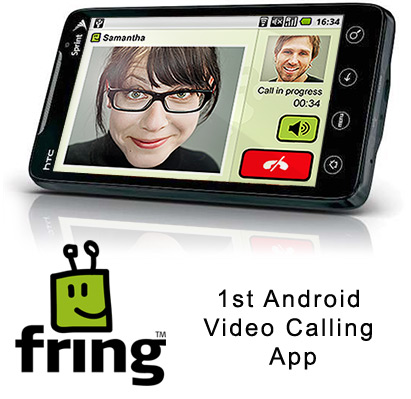
#10 Fring: Fring is the best multi-IM client I have used on Android so far. Nimbuzz comes in a close second, but the application was not working properly when I tried to start it the second time around. Fring supports most of the major IM protocol like Yahoo, Google Talk, and AIM. The only IM protocol which Fring does not support is Facebook Chat. The application has a greenish theme, and also displays your phone book contact with your IM contacts. Fring also allows users to make video calls via 3G or Wi-Fi to fellow Fring users. The only downside is that it displays ads and there is no paid version of the application available to remove them.


#9 WaveSecure: Scared of losing your high-end Android phone? Use WaveSecure then! I don’t think this application needs any introduction. WaveSecure is the best multi-platform security application for your phone. The application allows you to lock your phone down, remotely wipe the data in the event of a theft. The application allows you to backup and restore your contacts and SMS, and also helps you track down your phone location in case you lose it.

# 8 Endomondo: Endomondo is a sports tracking application for Android. The application is available for many other mobile operating systems like Symbian. The application supports quite a few ‘rare’ sports like Skating, Skiing, Snowboarding, along with the usual running and walking. DroidFit may be a better alternative to Endomondo for some users, but the latter has a nice UI which is very important. The best part about the application is that it allows you to track your workout online as well. Pretty handy I say! The application can be downloaded for free from the Android market.


#7 AppBrain: AppBrain allows you to remotely install applications on your Android phone. Users can browse the applications at Appbrain.com and remotely install them. The site also shows the users a list of most popular apps and the recommended applications. The site also allows users to share their applications among their friends and view what applications they have installed on their phone.

#6 Barcode Scanner: Read about an awesome application somewhere on the internet? In all probability, the application review must be accompanied with a QR code as well. The Barcode Scanner application uses the camera of your phone to decode the information hidden inside the QR code. Barcode Scanner is available for free at the Android Market.

#5 Rockplayer: It is a very well-known fact that nearly all the Android phones fall flat on their face when it comes to video playback. They don’t support most of the popular codes like Xvid/DivX. This is where Rockplayer comes to the rescue. The application was recently released in the Android Market and it supports a plethora of video codes. The supported video codec format list includes MKV, Xvid, DivX, and RMVB. The minimum Android OS version required is 1.6. A free as well as a paid version of the application is available at the Android Market.

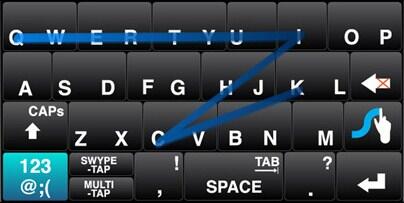
#4 Swype: I don’t think Swype needs any introduction to any Android user. Swype is hands down the best keyboard available for any Android phone out there. Using the Swype keyboard, users need to glide or swipe their hands across letters of the word they want to write. The rest of the work will be done by the smart algorithm of Swype. The prediction of Swype is quite precise as well. Swype comes pre-installed in many popular phones like the Droid X and the Galaxy S.


#3 Astro File Manager: This has to be the best file manager I have ever used in any mobile OS. Astro file manager can open ZIP and RAR files without any additional plugins. Along with this, the application also allows users to backup and restore their applications. Recently, the free version of Astro File manager was updated to include ads. However, there is an alternative paid version available for download as well.
#2 Advanced Task Manager: Most of the Android phones have around 250 to 512MB of RAM. Most of the time, this is more than enough. However, if a lot of applications are running in the background then the amount of free RAM depletes pretty quickly. This not only decreases the performance of the phone, but also kills the battery life. This is where Advanced Task Manager comes in. As the name suggests, Advanced Task Killer is well – task killer! There are two versions of the Advanced Task Killer available at the Android market place – a free version and a paid version. The free version has ads, while the paid version is ad free.

#1 Launcher Pro: This is a must have software for every Android phone owner. Launcher Pro replaces the default Android launcher, with a much more visually appealing launcher.  The software also works in Landscape mode,  which the default Android home screen does not. Along with the home screen, the application replaces the Menu of the phone with a ‘3D Drawer’, and it looks stunning.  Users can also set the number of home screens, as well as the theme of the dock. The software works like a charm, and is not a resource hogger. Launcher Pro is available for free at the Android Market. A paid version of the application recently hit the Android market as well. The ‘Plus’ version includes the different HTC styled widgets.


These are just some of the few apps in the Android Market which makes it a pleasure to use the phone. You might have your own favorites to share, tell us about them through your comments.

Related Posts Plugin for WordPress, Blogger...